VPS vs Dedicated Server for Databases: Which One Fails First Under Load?
Choosing between a VPS vs dedicated server for database workloads is not just a budget decision; it’s an architecture decision. On paper, both options can list the same specs, including 8 cores, 32 GB RAM, and NVMe storage. But under real database load, the gap between them becomes impossible to ignore. IOPS get throttled, RAM cache loses efficiency, write latency turns unpredictable, and recovery after a failure takes much longer than expected.
This guide breaks down exactly where each server type starts to strain, and finishes with a direct rule of thumb for three common database scenarios.
Table of Contents
The Core Difference Between VPS and Dedicated Servers
Before getting into metrics, understanding the core difference between VPS vs Dedicated Server for Databases is important.
A VPS is a virtual machine running on a shared physical server. A piece of software called a hypervisor, like KVM, VMware, or Xen, sits between your VM and the actual hardware, which controls how your instance accesses the CPU, RAM, and storage. Even if your plan says dedicated vCPUs, the physical CPU, its cache, and the storage controller are still shared with other VMs on the same machine. You are always competing for resources with other customers on the same host.
A dedicated server is a physical machine that belongs entirely to you. There is no hypervisor, no other tenants, and nothing between your database and the hardware. Every CPU cycle, every GB of RAM, and every storage operation is yours alone.
For a simple website, this difference does not matter. For a database running thousands of read and write operations per second, it determines whether performance stays consistent or starts breaking down under load.
Now that you know how each server is built, let’s see exactly where the VPS starts to break down under database load.
IOPS: This Is Where the Gap Begins
IOPS stands for Input/Output Operations Per Second, basically how many read and write requests your storage can handle every second. For databases like MySQL, PostgreSQL, and MongoDB, this number matters more than almost anything else.
Every time a query runs, the database is constantly reading small pieces of data from disk and writing changes back. The faster the storage can handle those operations, the faster the database responds.
How VPS IOPS Actually Works
In a VPS environment, your storage is typically one of two things:
- A network-attached SAN shared across multiple VMs, physically remote storage accessed over a high-speed internal network.
- A localized NVMe array shared among tenants on the same node, which is faster, but still shared.
Both setups share one problem: the provider puts a hard limit on how many IOPS your VM can use. This stops one tenant from hogging the storage and slowing down everyone else. In practice, these limits can be very low; one benchmark found a VPS capped at exactly 19,999 IOPS, no matter the workload.
Even without hard caps, sharing storage with other VMs creates another problem. When multiple VMs all read and write at the same time, the storage controller gets hit from every direction at once. It slows down trying to handle all of it, and your database pays the price.
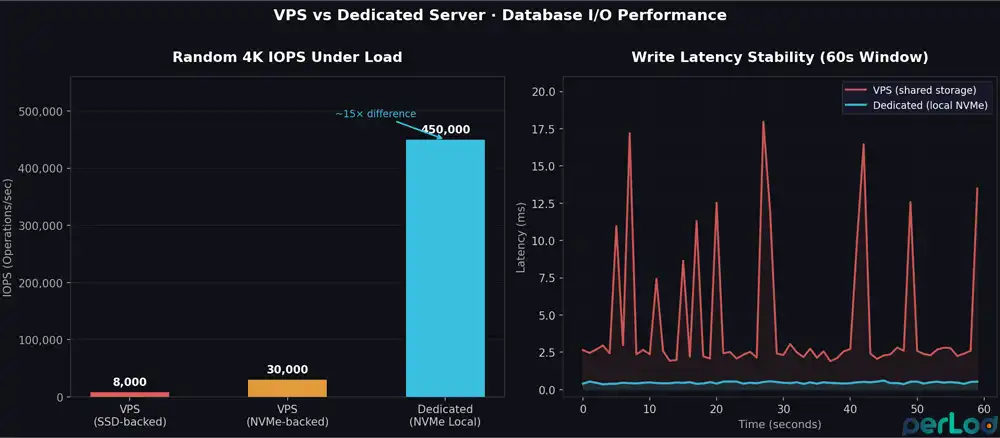
A benchmark analysis shows that this makes latency completely unpredictable; one minute you get 0.5ms, the next it jumps to 15ms, depending on what your neighbors are doing.
Typical VPS IOPS limits in production:
| Storage Type | Realistic IOPS Range | Notes |
|---|---|---|
| VPS on SSD-backed SAN | 3,000 – 10,000 | Common on budget plans |
| VPS on NVMe-backed array | 15,000 – 50,000 | With QoS limits enforced |
| Dedicated server, local NVMe | 100,000 – 500,000+ | Unthrottled, flat latency |
The Real Impact of IOPS on Database Performance
MySQL and PostgreSQL write to disk on every single committed transaction to keep your data safe. At 1,000 transactions per second, that’s already 1,000 write operations per second, just for the transaction log, before any actual data is written.
On a VPS with an IOPS cap, this is where things start slowing down, transactions queue up, and query latency starts climbing.
On a dedicated server, the NVMe drive is connected directly to the machine and serves only your database. NVMe PCIe 4.0 drives can handle 400,000 to 800,000 read IOPS, and up to 950,000 write IOPS, with latency as low as 10 to 20 μs. There are no caps, no shared queues, and no other tenants affecting your performance.
RAM Cache: The Bottleneck You Don’t See Coming
MySQL and PostgreSQL both keep frequently used data in memory to avoid reading from disk every time. In MySQL, this is called the InnoDB buffer pool; in PostgreSQL, it’s called shared_buffers.
The more data that fits in this memory cache, the faster queries run. When the cache is too small or unstable, the database falls back to disk, and that’s when latency spikes.
The VPS RAM Problem
On a VPS, you get the RAM your plan promises. But having it reserved does not mean you have it all to yourself. Two things can quietly eat into your effective memory under load:
1. Steal Time: Sometimes the hypervisor takes CPU time away from your VM to give it to another tenant. This is called steal time, and you can see it in tools like top as %steal. On busy VPS nodes, it can go above 5%, and when it does, your database threads sit waiting for CPU, causing latency spikes that have nothing to do with your disk or queries.
Testing confirms dedicated servers always show 0% steal time, because there is no hypervisor taking anything away.
2. L3 Cache Contention: Even with dedicated vCPUs, the CPU’s cache memory is still shared between all tenants on the same physical machine. If a neighbor is running something heavy, another database, a build job, or an ML workload, they compete for the same cache.
Your database is constantly pulling data into CPU cache for index lookups, and when that cache gets crowded by others, performance becomes unpredictable.
In practice, it is recommended to set the InnoDB buffer pool to 70 to 80% of your RAM. On a 16 GB VPS, that’s around 11 to 13 GB. The problem is that if the hypervisor is under memory pressure, your VM may get less than what your plan advertises.
If your database runs out of RAM and starts using swap, performance collapses, because swap hits the same shared storage that’s already under load.
On a dedicated server, you allocate RAM with confidence. A 256 GB server can run a 200 GB buffer pool with nothing competing for it. If your working dataset fits in memory, most reads never touch the disk at all.
| Workload | Minimum RAM(VPS) | Recommended RAM(Dedicated) |
|---|---|---|
| MySQL/PostgreSQL, small DB (<20 GB) | 4 to 8 GB | 8 to 16 GB |
| MySQL/PostgreSQL, medium-traffic | 16 to 32 GB | 32 to 64 GB |
| MongoDB/Redis, in-memory focused | 32 GB+ (risky on VPS) | 64 to 128 GB+ |
| Elasticsearch / analytics nodes | Avoid VPS | 64 to 128 GB per node |
Heavy Writes: This Is Where the Real Gap Shows
Read-heavy workloads are easier on a VPS because most reads can be served from memory. Writes are different; every write has to hit the disk, and that’s where the gap between VPS and dedicated becomes impossible to hide.
What Happens to VPS Storage Under Write Load
Every major relational database engine performs write operations in layers, including:
- Transaction log (WAL and Redo Log): Every committed transaction is written to disk before it is confirmed.
- Data writes: Changed data is flushed from memory to the actual database files.
- Checkpoints: The database periodically syncs everything in memory to disk.
- Background tasks: Cleanup jobs like PostgreSQL VACUUM and MySQL InnoDB purge run in the background
All of these hit the disk constantly. On a VPS, your storage is shared, so when your database runs a checkpoint at the same time a neighboring VM is doing a backup, both are fighting for the same write bandwidth. The storage controller queues them both; your checkpoint slows down, and in MySQL, that means the redo log fills up faster. If it fills, new writes stop until it clears, a hard stop.
What Changes With Local Dedicated Storage
On a dedicated server, the NVMe drive is physically inside the machine and connected directly to it; there is no shared storage, no network in between, and no caps. Write latency stays flat and predictable, whether your database is running a checkpoint or inserting millions of rows; nothing outside your server can affect it.
For databases set to full ACID compliance, every single transaction must be confirmed on disk before it is considered done.
On a VPS, when storage latency spikes, transaction commit times spike with it, and under load, that variance adds up fast.
On a dedicated server with local NVMe, commit times stay consistent no matter how busy the database gets.
Recovery Windows: VPS vs Dedicated After a Crash
When something goes wrong, the only thing that matters is how fast you can get the database back up and running. And that depends entirely on how your server is set up.
VPS Recovery Scenarios
Snapshot-based backup: Most VPS providers back up your server using snapshots, which briefly pause all disk writes to capture a clean image.
Even a 2 to 5 second pause can cause connection timeouts and failed writes on a busy database. Some providers skip the pause using a copy-on-write method, but that can produce an inconsistent backup that’s unreliable for database recovery.
Underlying host failure: If the physical server your VPS runs on fails, you can’t do anything; the provider handles it, and you just wait. Migration to a new host can take anywhere from 15 minutes to several hours, depending on how serious the failure is. Your database is down the entire time.
Storage node failure: If the shared storage your VPS sits on fails, recovery is completely out of your hands. You have no visibility into how the provider handles it or how long it will take.
Dedicated Server Recovery Scenarios
A dedicated server shifts recovery control to you.
Hardware RAID with hot spares: A dedicated server can be set up with RAID 10 and a spare drive on standby. If one drive fails, the system automatically starts rebuilding onto the spare, no downtime, no interruption, and your database keeps running. A single drive failure is handled automatically without you doing anything.
IPMI access: Dedicated servers give you a separate management interface that works even when the OS is down. If the server crashes, you can connect remotely, see what’s happening, reboot it, or boot from a recovery image, all without waiting for support. On a VPS, none of this is possible.
Point-in-time recovery: Both VPS and dedicated servers support WAL archiving, which lets you replay transaction logs and restore the database to any specific point in time.
On a dedicated server, this works reliably because you control the storage. On a VPS, it can work too, but whether it actually holds up during a real failure depends on how the provider’s shared storage behaves, which you can’t control.
| Recovery Scenario | VPS | Dedicated Server |
|---|---|---|
| Single drive failure | Provider-dependent (invisible to you) | RAID 10 auto-rebuild, zero downtime |
| OS/DB crash | Reboot via provider panel (minutes) | IPMI direct access (seconds) |
| Underlying host failure | Provider migration (15 min – hours) | Your hardware, your timeline |
| Snapshot restore | Provider tools, I/O freeze during snapshot | Custom tools, hardware RAID snapshot |
| Point-in-time recovery | Possible with WAL archiving | Possible with WAL archiving + faster storage |
Decision Guide: VPS vs Dedicated Server for Databases
Every database workload is different, but most fall into one of three categories. Here is a simple answer for each one.
For a small app database, you can use a reliable Linux VPS. If your database is under 50 GB, traffic is moderate, and writes stay in the hundreds per second, a good NVMe VPS is enough.
Set your InnoDB buffer pool to 60 to 70% of RAM, add Redis for read-heavy tables if needed, and keep an eye on iowait. If it stays below 5% at peak, you’re in the right place. The PerLod iNVME and eNVME plans are a solid starting point.
For an analytics database, you can start with a memory-efficient dedicated server and configure it for RAM.
Analytics workloads such as reporting, large joins, and aggregations are not heavy on writes but are very memory-intensive. When a query scans gigabytes of data, everything that isn’t already in RAM has to be read from disk. The more RAM you have, the less that happens.
A dedicated server with 256 to 512 GB RAM can keep your entire working dataset in memory, making most queries much faster. PerLod’s Netherlands dedicated servers go up to 512 GB RAM, which covers serious analytics workloads. If you use PostgreSQL, tune work_mem to give parallel queries enough memory to run efficiently.
For a write-heavy production setup, it is recommended to use a dedicated server with NVMe storage and RAID 10.
If your database handles over 1,000 writes per second, runs bulk inserts, or ingests data in real time, a VPS will not be able to keep up. The IOPS caps, unpredictable write latency, and lack of hardware control create too many ways for things to go wrong.
On a PerLod dedicated server, set up NVMe in RAID 10 with a hot spare, enable WAL archiving, and size your buffer pool to 70 to 80% of RAM. You get stable write latency, automatic drive failure recovery, and full control over your setup.
Conclusion
A VPS is a capable starting point for most database workloads, until load increases and the shared infrastructure starts showing its limits. IOPS get capped, RAM cache becomes unreliable, writes slow down, and recovery takes longer than it should. A dedicated server removes all of those constraints; the hardware is yours, the resources are guaranteed, and the performance is predictable.
The right choice depends on your workload. Start with a VPS, watch the metrics, and move to dedicated when the numbers tell you to.
Tip: If you are not sure that you have already hit that point, read this guide on When to Move from VPS to Dedicated Server.
If you are ready to deploy, choose the right PerLod server for your database workload.
We hope you enjoy this guide on VPS vs Dedicated Server for Databases. Subscribe to our X and Facebook channels to get the latest hosting updates.
FAQs
Is a VPS good enough for a production database?
Yes, for small to medium workloads. If your database is under 50 GB and writes stay in the hundreds per second, a good NVMe VPS handles it fine. Beyond that, you will start hitting its limits.
How many IOPS does MySQL or PostgreSQL need?
It depends on your workload, but a busy transactional database can easily need 10,000 to 50,000 IOPS or more. Most VPS plans cap well below that under real load.
What is the best server setup for a write-heavy database?
A dedicated server with local NVMe in RAID 10, a hot-spare drive, WAL archiving enabled, and the buffer pool sized to 70 to 80% of RAM. This gives you stable write latency and automatic recovery from drive failure.

