Storage VPS Hosting

1 TB to 4 TB of HDD space for offsite backups, archives and large files.

Every plan has a 1 Gbps port and 3 TB of traffic a month. Send backups from your servers over rsync or SFTP, or choose TrueNAS or Proxmox Backup Server when you order.

  • 3 TB of traffic a month, up to 10 TB
  • TrueNAS and Proxmox Backup Server
  • 9 locations in Europe and North America
  • Ready within 30 minutes
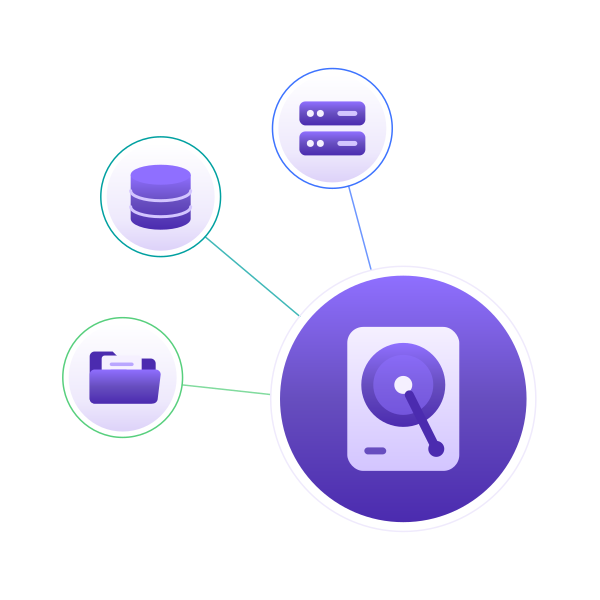
Backups flowing from servers, databases and files to a storage VPS

Find and Configure Your Storage VPS Plan

Every plan has HDD storage, a 1 Gbps port and 3 TB of traffic. Add traffic or IPv4 addresses when you order.

Save up to 14% with annual billing

Volume

Smart Storage, Simple Choice

Regular monthly price $20.99.

$18.08 per monthSave 14%

$216.99 billed yearly

CPU
2 vCPUs
RAM
4 GB DDR3
Storage
1 TB HDD
Port
1 Gbps
Bandwidth
3 TB / month
  • More than 10 locations
  • Ready within 30 minutes
  • 10-day money-back guarantee

Recommended

Depot

Built for Growing Storage

Regular monthly price $31.99.

$28.17 per monthSave 12%

$337.99 billed yearly

CPU
4 vCPUs
RAM
8 GB DDR3
Storage
2 TB HDD
Port
1 Gbps
Bandwidth
3 TB / month
  • More than 10 locations
  • Ready within 30 minutes
  • 10-day money-back guarantee

Vault

Maximum Space, Maximum Confidence

Regular monthly price $59.99.

$52.83 per monthSave 12%

$633.99 billed yearly

CPU
8 vCPUs
RAM
12 GB DDR3
Storage
4 TB HDD
Port
1 Gbps
Bandwidth
3 TB / month
  • More than 10 locations
  • Ready within 30 minutes
  • 10-day money-back guarantee

Built for Storage

What every Storage VPS plan gives your data.

Terabytes of HDD

From 1 TB to 4 TB, priced for disk space rather than CPU.

Backup OS at Checkout

Choose TrueNAS or Proxmox Backup Server, or any Linux distribution.

3 TB of Traffic

A 1 Gbps port with 3 TB a month, or up to 10 TB when you need it.

Remote Access

Reach your server over SSH, SFTP or rsync and script your backup jobs.

Storage-Ready Operating Systems

Run a Linux distribution, or choose TrueNAS or Proxmox Backup Server for a NAS or a backup target.

Select an operating system to view supported versions.

Supported Versions
22.04 LTS, 24.04 LTS, 26.04 LTS

What You Can Run on a Storage VPS

Keep data you need to hold on to away from the servers that make it.

Offsite Server Backups

Keep a copy of your servers' data in another location.

Database and App Backups

Send nightly database dumps and app backups here, ready to restore.

Long-Term Archives

Move logs, exports and old projects here and free up your main servers.

Media and Downloads

Store large media files and serve them to users within your traffic.

Cloud NAS

Keep shared files on TrueNAS or Linux and reach them over SFTP or a VPN.

Transfer Space

Park data here while you move it between servers, providers or locations.

Choose Where Your Backups Live

9 Storage VPS locations in 9 countries across Europe and North America.

Pick a location away from the servers you back up.

  • Netherlands
  • Finland
  • Germany
  • Spain
  • France
  • Poland
  • Russia
  • Switzerland

Tools to Manage. People to Help.

Manage your server directly, and know where to turn when you need a hand.

Console and Power Controls

Browser console, power controls and reinstall requests.

Live Chat, 24/7

Live chat is open day and night for questions about your service.

Managed Support

The server is yours to manage. For hands-on help, add Managed Support.

Buy with Confidence

The terms are published, so you know them before you pay.

10-Day Money-Back Guarantee

Not the right fit? Ask for a refund within 10 days of activation. The Refund Policy shows exactly how it works.

Read the Refund Policy

99.9% Monthly SLA

Every VPS is backed by a 99.9% monthly infrastructure SLA. If we fall short, you can claim service credits to your Wallet.

Read the SLA

Buy Storage VPS with Card or Crypto

Card or crypto, whichever suits you.

Crypto Payments

Support for Bitcoin, USDT, USDC, and over 400 crypto assets.

Simple, Private Signup

Just an email address to get started. No ID documents for standard orders.

Storage VPS Hosting FAQs

Straight answers about disks, backups and plans.

A virtual server with a large HDD instead of a small, fast SSD. It suits data you keep rather than data you work on all day: backups, archives and big files. You manage the server and set up your backup jobs. A reinstall erases the disk, so keep another copy of important data elsewhere. For websites and apps, choose a Linux VPS.

Usually, yes. Backups and archives read and write large files in order, which HDDs handle well. Databases and busy apps need fast random access, so run them on an SSD VPS and back them up here.

Yes. Choose TrueNAS or Proxmox Backup Server when you order and your server is delivered with it installed. You can also pick any Linux distribution from the list above.

Pick by disk space: Volume has 1 TB, Depot has 2 TB and Vault has 4 TB. CPU and RAM grow with each plan, which helps with compressed backups. TrueNAS recommends at least 8 GB of RAM, so choose a plan with 8 GB or more for it.

Every plan includes 3 TB a month on a 1 Gbps port. When you order, you can raise it to 5 TB or 10 TB a month.

Over SSH or SFTP on Linux, with rsync or the backup tool you already use. TrueNAS and Proxmox Backup Server also give you their own web interface.

Within 30 minutes of payment, with the operating system you chose installed.

Storage VPS comes with a 10-day money-back guarantee, explained in our Refund Policy. Pay by card or with 400+ cryptocurrencies, including Bitcoin, USDT and USDC.

Can't find an answer to your question? Submit request

Keep Your Backups Offsite

Pick a plan and a location, then point your backups at it. Your Storage VPS is ready within 30 minutes.

Not sure which plan fits? Talk to our team.