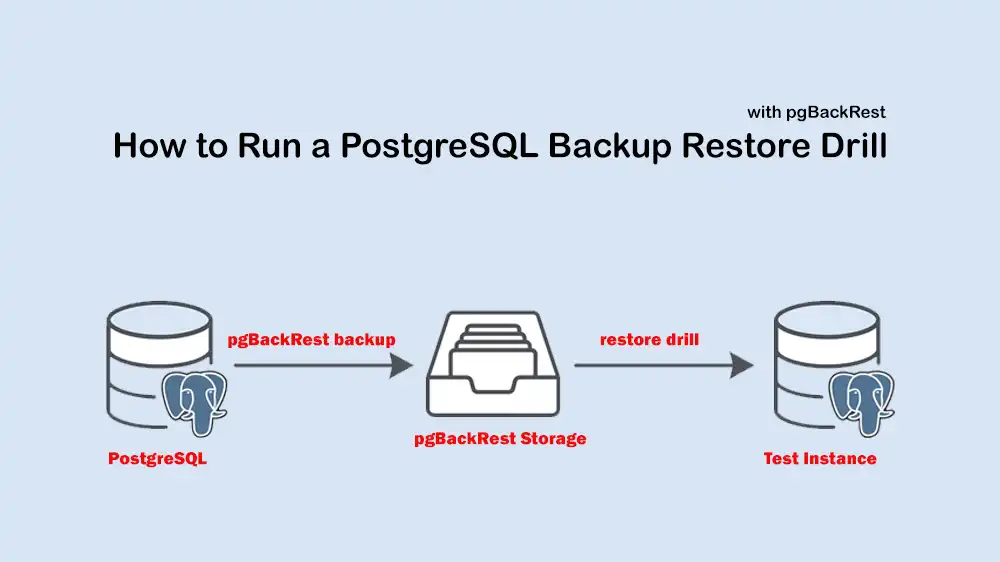
PostgreSQL Backup Restore Drill: How to Verify pgBackRest Backups Before You Need Them
If you run PostgreSQL in production, taking backups is not enough. You must prove that you can restore them under pressure and when things break. This is where a PostgreSQL backup restore drill comes in. In this guide, you learn how to restore pgBackRest backups into a test environment, validate timelines, and run basic application checks so your team can trust backups before they are needed in a real problem.
For setup and configuration of pgBackRest itself, you can check this guide on How to Set Up pgBackRest for PostgreSQL Backups and Point-in-Time Recovery.
Table of Contents
Why a PostgreSQL Backup Restore Drill Matters
Most teams only test backups when they are already down. A PostgreSQL backup restore drill turns that high‑stress moment into a regular task where you control the conditions instead of the outage controlling you.
With a regular PostgreSQL backup restore drill, you can catch issues like missing WAL files, broken retention, wrong backup scopes, or invalid archive_command settings before they hurt you in production.
The Environment You Need
You do not need a full copy of your production cluster to practice. For a PostgreSQL backup restore drill, you only need:
- A pgBackRest repository that already holds your backups.
- A test instance where you can restore and run checks, like a container, VPS, or spare VM.
- Enough CPU and disk to restore and start PostgreSQL once.
If you want predictable storage and full root control while you run your drills, you can use a reliable dedicated server.
Backup Restore Drill Using Docker and pgBackRest
This PostgreSQL backup restore drill flow assumes:
- You already have working pgBackRest backups.
- Your repo is available on the drill host at /var/lib/pgbackrest.
- Your pgbackrest.conf already defines a stanza named pg.
- You use PostgreSQL 16 and the standard container image.
The drill focuses only on restoration and validation, not on backup setup.
Step 1. Create Docker Network and Volume
First, you must create a small isolated environment with the commands below:
docker network create pg-drill-net
docker volume create pg-drill-data
Step 2. Create the Test PostgreSQL Container
Run a PostgreSQL container once so Docker’s volume gets initialized:
docker run -d \
  --name pg-drill \
  --network pg-drill-net \
  -e POSTGRES_PASSWORD=drillpass \
  -v pg-drill-data:/var/lib/postgresql/data \
  postgres:16
Stop it so the data directory is free for restore:
docker stop pg-drillNow you have a target for the PostgreSQL backup restore drill.
Step 3. Run a pgBackRest Helper Container
Now, you must run a helper container that can see both the pgBackRest repo and the target data directory:
docker run --rm -it \
  --name pgbackrest-drill-helper \
  --network pg-drill-net \
  -v /var/lib/pgbackrest:/var/lib/pgbackrest \
  -v /etc/pgbackrest:/etc/pgbackrest \
  -v pg-drill-data:/var/lib/postgresql/data \
  postgres:16 bash
Inside that container, install pgBackRest:
apt update
apt install pgbackrest -y
Fix ownership of the data path:
chown -R postgres:postgres /var/lib/PostgreSQLAt this point, you are ready to run the PostgreSQL backup restore drill.
Step 4. Restore the Latest Backup
Use the command below to restore the latest backup into /var/lib/postgresql/data:
sudo -u postgres pgbackrest \
  --stanza=pg \
  --pg1-path=/var/lib/postgresql/data \
  --delta \
  --log-level-console=info \
  --target-action=promote \
  restore
This proves you can bring the cluster back to the latest backup that pgBackRest knows about.
Step 5. Optional Point-in-time Restore Drill
If you want to drill a recovery to a specific time, for example, just before a bad deployment, you can use a time target:
sudo -u postgres pgbackrest \
  --stanza=pg \
  --pg1-path=/var/lib/postgresql/data \
  --delta \
  --log-level-console=info \
  --type=time \
  --target="2026-06-16 09:30:00+00" \
  --target-action=promote \
  restore
This point‑in‑time PostgreSQL backup restore drill is useful when you want to simulate data loss or a bad migration and verify you can roll back to the right moment.
Exit the helper container when restore finishes:
exitStart the Restored Instance and Watch Recovery
At this point, you can start the test instance you just restored:
docker start pg-drillFollow the logs as PostgreSQL starts up:
docker logs -f pg-drillIf the server refuses to start, the drill has already been done, because you have found a real restore bug, like permissions, missing WAL, or corrupted backup, while everything is still safe.
Cluster and Timeline Checks for the Drill
Once the container is running, you can verify the result of the PostgreSQL backup restore drill at the database level.
1. Basic cluster checks: Check the PostgreSQL version and that the instance responds:
docker exec -it pg-drill psql -U postgres -c "SELECT version();"List databases:
docker exec -it pg-drill psql -U postgres -c "\l"2. Schema and row-count checks: Confirm that your key database and its tables exist after the PostgreSQL backup restore drill:
docker exec -it pg-drill psql -U postgres -d yourdb -c "\dt"Check row counts for important tables:
docker exec -it pg-drill psql -U postgres -d yourdb -c "SELECT COUNT(*) FROM users;"
docker exec -it pg-drill psql -U postgres -d yourdb -c "SELECT COUNT(*) FROM orders;"
You can record expected ranges in your runbook so each drill has a clear pass/fail basis for data volume.
3. Timeline and control data: When you perform a point‑in‑time drill, you may also want to check the control data:
docker exec -it pg-drill bash -c "pg_controldata /var/lib/postgresql/data | egrep 'Database system identifier|Latest checkpoint location|Timeline'"This lets you confirm you landed on the expected timeline and checkpoint, especially when simulating a real recovery scenario.
Run Application-level Checks
A PostgreSQL backup restore drill is not complete until you confirm that the application’s point of view also looks healthy. Assume your app uses:
- user: app_user
- database: yourdb
- password: app_password
From the drill host, run:
PGPASSWORD='app_password' psql \
  -h 127.0.0.1 \
  -p 5432 \
  -U app_user \
  -d yourdb \
  -c "SELECT 1;"
Run a basic business query that should always work after a drill:
PGPASSWORD='app_password' psql \
  -h 127.0.0.1 \
  -p 5432 \
  -U app_user \
  -d yourdb \
  -c "SELECT id, created_at FROM orders ORDER BY created_at DESC LIMIT 5;"
You can combine these into a reusable script:
cat > pg-drill-smoke.sh <<'EOF'
#!/usr/bin/env bash
set -euo pipefail

PGPASSWORD='app_password' psql -h 127.0.0.1 -p 5432 -U app_user -d yourdb -c "SELECT 1;"
PGPASSWORD='app_password' psql -h 127.0.0.1 -p 5432 -U app_user -d yourdb -c "SELECT COUNT(*) FROM users;"
PGPASSWORD='app_password' psql -h 127.0.0.1 -p 5432 -U app_user -d yourdb -c "SELECT COUNT(*) FROM orders;"
EOF

chmod +x pg-drill-smoke.sh
./pg-drill-smoke.sh
This script becomes the health check part of every drill you run.
Step-by-step Restore Drill Checklist
Here is a simple checklist you can paste into your team wiki and use for each restore drill:
Pick a backup target:
- Decide on the latest backup or a specific point in time.
- Note the drill date, backup label, and, if used, the target timestamp.
Prepare test environment:
- Create a Docker network and volume, or reset a test VM.
- Ensure pgBackRest repo and config are mounted or available.
Run restore:
- Use the helper container to run pgbackrest restore.
- For PITR, set
--type=timeand--target=….
Start PostgreSQL:
- Start the container or service.
- Watch logs and record any errors.
Validate cluster:
- Run version check, list databases, list tables.
- Run row-count checks for critical tables.
Application checks:
- Run scripted app-level smoke tests.
- Record any failed queries or missing data.
Record timing and outcome:
- Note how long the restore drill took end‑to‑end.
- Log issues and create follow‑up tasks to fix them.
Teams often schedule this checklist monthly and track it like any other SRE operational task. If you want a small but flexible host just for running these drills, a flexible Linux VPS server is enough.
Conclusion
A PostgreSQL backup restore drill is the missing link between taking backups and recovering for sure. By restoring pgBackRest backups into a test instance, checking timelines, and running application-level tests, you can turn backups into a proven capability.
Start small, then automate it and track it as a regular reliability task. When a real outage comes, your team will already know the steps, the timing, and the risks.
We hope you enjoy this guide.
For additional background on backup verification and integrity checking, you can check the official PostgreSQL pg_verifybackup documentation.
FAQs
How often should I run a PostgreSQL backup restore drill?
At least once per month is a good baseline, and weekly for very critical systems.
Can I use the production server itself for running Drill?
No, avoid that. Always use a separate container or host so you never touch the real data directory.
Does a restore drill replace other monitoring?
No. It complements monitoring by testing the actual restore path instead of just checking that backup jobs run.

